
1. A More Flexible Future for Vector Databases
Qdrant 1.18 is a big step toward making vector databases more flexible and easier to manage in production. Instead of treating vector indexes as something rigid that needs rebuilding every time you change them, Qdrant is moving toward a more dynamic system that can adapt while staying online.
For teams running AI systems at scale, this means better scalability, better monitoring, and fewer painful maintenance operations.
This release focuses on five major improvements:
- In-place vector schema updates
- Better memory monitoring
- Improved audit logging
- Stronger strict mode protections
- TurboQuant, a new high-efficiency quantization method
One of the biggest improvements starts with solving a long-time issue in vector databases: re-indexing.
2. Dynamic Updates Without Rebuilding Collections
In AI applications, embedding models change often. Before Qdrant 1.18, updating a collection’s vector setup usually meant recreating the collection and re-uploading all data.
Now, Qdrant allows adding or removing named vectors directly using the PATCH API or schema endpoints, without downtime.
This means your collection structure can evolve together with your application while the cluster keeps running normally.
Real-World Benefit
A common use case is migrating to a new embedding model.
You can now:
- Create a new vector field
- Re-embed data gradually in the background
- Test the new setup
- Remove the old vector field later
All without shutting down the cluster or re-importing everything.
As collections become more dynamic, monitoring resource usage becomes even more important.
To add a new dense named vector to an existing collection:
client.create_vector_name(
    collection_name="{collection_name}",
    vector_name="{vector_name}",
    vector_name_config=models.DenseVectorNameConfig(
        dense=models.DenseVectorConfig(
            size=256,
            distance=models.Distance.COSINE,
        ),
    ),
)
To add a new sparse named vector to an existing collection:
client.create_vector_name(
    collection_name="{collection_name}",
    vector_name="{vector_name}",
    vector_name_config=models.SparseVectorNameConfig(
        sparse=models.SparseVectorConfig(
            modifier=models.Modifier.IDF,
        ),
    ),
)
3. Better Memory Monitoring and Observability
Memory usage in databases is often difficult to understand because operating system metrics don’t clearly show what is using RAM.
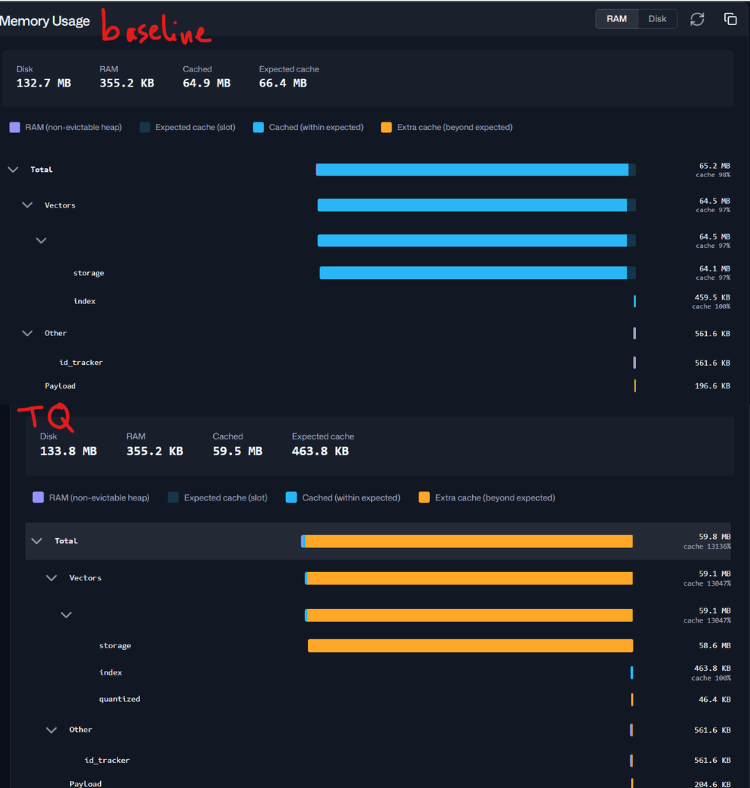
Qdrant 1.18 improves this with detailed memory monitoring for each collection component. These metrics are available both in the Web UI and through an API endpoint.
Memory Breakdown by Component
| Component | What It Tracks |
|---|---|
| Vectors | Dense vectors, HNSW indexes, quantization data, RAM usage, cached pages |
| Sparse Vectors | Sparse vector storage and indexing memory |
| Payload | Metadata storage attached to vectors |
| Payload Index | Memory used for metadata indexes |
| ID Tracker | Mapping between external IDs and internal IDs |
Understanding “Expected Cache”
Modern operating systems use free RAM as file cache to improve performance. When vectors are stored with on_disk: true, the OS automatically keeps frequently used data in memory.
The Expected Cache metric shows how much data should ideally stay cached for fast searches.
If the Cached value is high, that’s usually a good sign, not a memory leak.
Comparing these values helps determine whether your system is properly warmed up for production traffic.
For a deeper technical explanation, see my last blog at:
TurboQuant: the compression Shannon would approve
4. TurboQuant: Better Compression Without Losing Too Much Accuracy
Before this release, there was a large gap between Scalar Quantization and Binary Quantization in terms of compression and recall quality.
TurboQuant fills that gap.
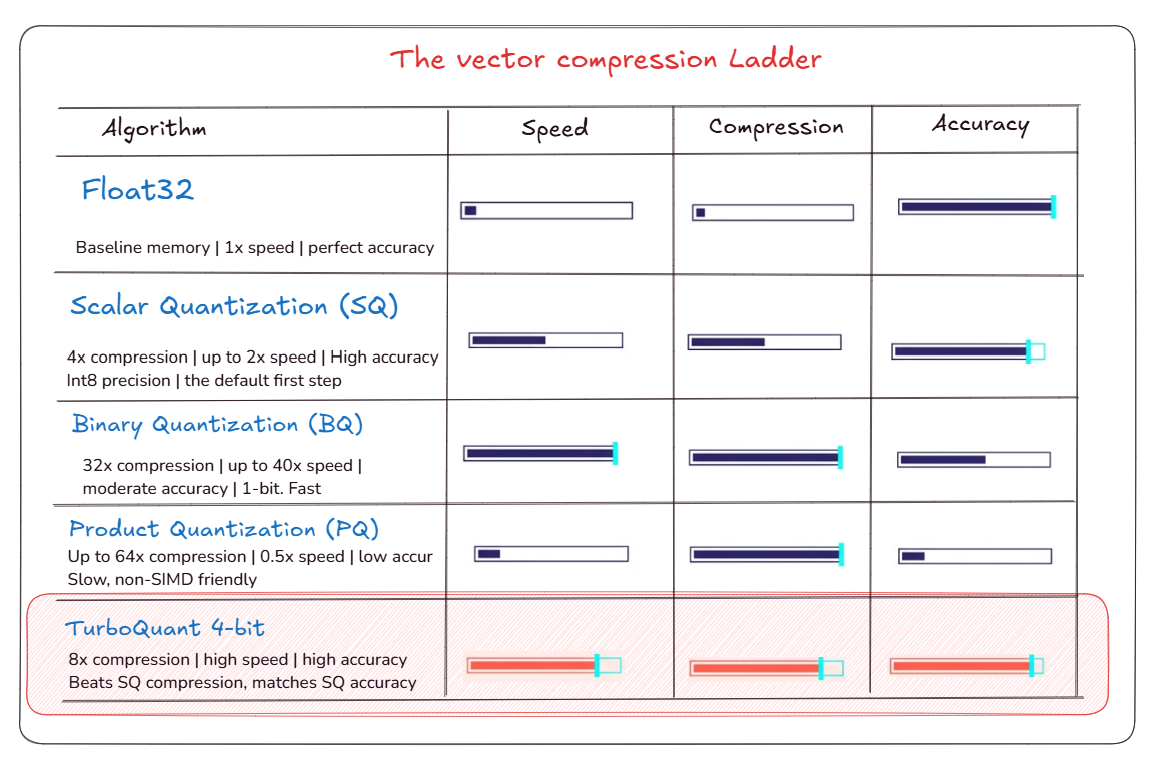
It offers compression between 8x and 32x while still keeping strong recall performance.
TurboQuant works using:
- Walsh-Hadamard rotations
- Lloyd-Max quantization
- Additional calibration techniques for real-world embeddings
One important advantage is that the rotation step preserves distances, so queries stay efficient without requiring expensive reverse operations.
Practical Results
- TQ 4-bit is a strong replacement for Scalar Quantization users, cutting memory usage in half while keeping recall very close to the original.
- TQ 1-bit and 2-bit significantly improve recall compared to traditional Binary Quantization at the same storage size.
In some datasets, TurboQuant improved recall by more than 20 percentage points compared to standard binary quantization.
Performance Optimizations
TurboQuant also uses low-level SIMD optimizations to keep searches fast even with heavy compression.
This allows Qdrant to reduce memory usage while still maintaining strong throughput.
For a full technical breakdown of TurboQuant and its math, check:
https://mohamedarbi.xyz/posts/turboquant-qdrant
5. Better Security and Infrastructure Protection
Qdrant 1.18 also adds several features focused on operational safety and debugging
Query Audit Logs
Administrators can now search JSON audit logs across the cluster using filters such as:
- Time ranges
- User or subject information
This simplifies security reviews and troubleshooting.
Request Tracing
Support for headers like:
x-request-idx-tracing-idtraceparent
makes it easier to connect client requests with server logs during debugging.
Strict Mode Improvements
New protections help avoid resource exhaustion:
max_resident_memory_percentprevents memory-heavy writes when the system is close to running out of memory.search_max_batchsizeprevents very large workloads from affecting other users or collections.
Per-Collection Metrics
The new ?per_collection=true parameter helps identify latency spikes for specific collections in multi-tenant environments.
6. Conclusion
Qdrant 1.18 makes vector search systems more flexible, observable, and production-ready.
With dynamic schema updates, improved monitoring, TurboQuant compression, and stronger operational safeguards, this release helps teams scale AI applications more efficiently.
Upgrade Path
Recommended upgrade order:
- 1.16.x → 1.17.x → 1.18.0
Cloud Users
Select version 1.18 from the Qdrant Cloud dashboard for automatic migration.
Self-Hosted Users
Perform rolling node restarts and verify each node before moving to the next one to maintain availability.
Overall, Qdrant 1.18 gives developers more flexibility to evolve their vector search systems without sacrificing stability or performance.
References
- Qdrant Team. Qdrant 1.18 Release Notes and Documentation.
- Qdrant Documentation: Collections and Schema Updates.
- Qdrant Documentation: Monitoring and Observability.
- Qdrant Documentation: Strict Mode and Configuration.
- TurboQuant in Qdrant: Compression, Recall, and Performance.

(END)