Qdrant 1.20 just landed, and if 1.19 was the “pick your trade-off consciously” release, this one is the “stop doing extra work” release. The headline is easy to say: you can now rank with BM25 directly on a full-text index. No sparse vectors. No inference step. No avg_len you have to compute yourself. The text already sitting in your payload becomes rankable the moment you index it
but that’s only the first item on the menu. As usual, we’ll go feature by feature in the simplest words possible, with a diagram for every concept and runnable code for every feature. And this time I didn’t just read the release notes: I downloaded the Qdrant 1.20.0 binary and ran every snippet in this post against it. All the scripts live in my qdrant-resources repo, no API keys, no model downloads
here’s the menu:
- BM25 on full-text indexes: keyword ranking without sparse vectors
- The
codetokenizer:getUserName,get_user_nameanduser namefinally match each other - Per-element indexes: nested filters answered from indexes alone (I measured 7x)
turbo16andturbo8: two new TurboQuant datatypes, plusbits8quantization- Memory tiers, round two: the ID tracker gets a tier, inline storage stops duplicating vectors
- Cluster security hardening: internal auth by default, private p2p interface
- what else shipped, and how to upgrade without breaking your cluster
1. BM25 on Full-Text Indexes: no more sparse vector detour
quick recap first. Qdrant has supported full-text search for a long time, but full-text filtering only tells you whether a document contains the words. To rank results by keyword relevance with BM25, you had to go through sparse vectors: convert every document into a sparse vector with a BM25 model, convert every query the same way, and search the sparse index
here’s the thing about that approach: BM25 needs corpus statistics, and the most annoying one is the average document length. With sparse vectors, that value gets baked into every stored vector at write time. Your data grows, your average length drifts, and your scores slowly become less accurate. The only fix is re-converting everything. Plus, every single query pays an inference step
the diagram below shows the difference:
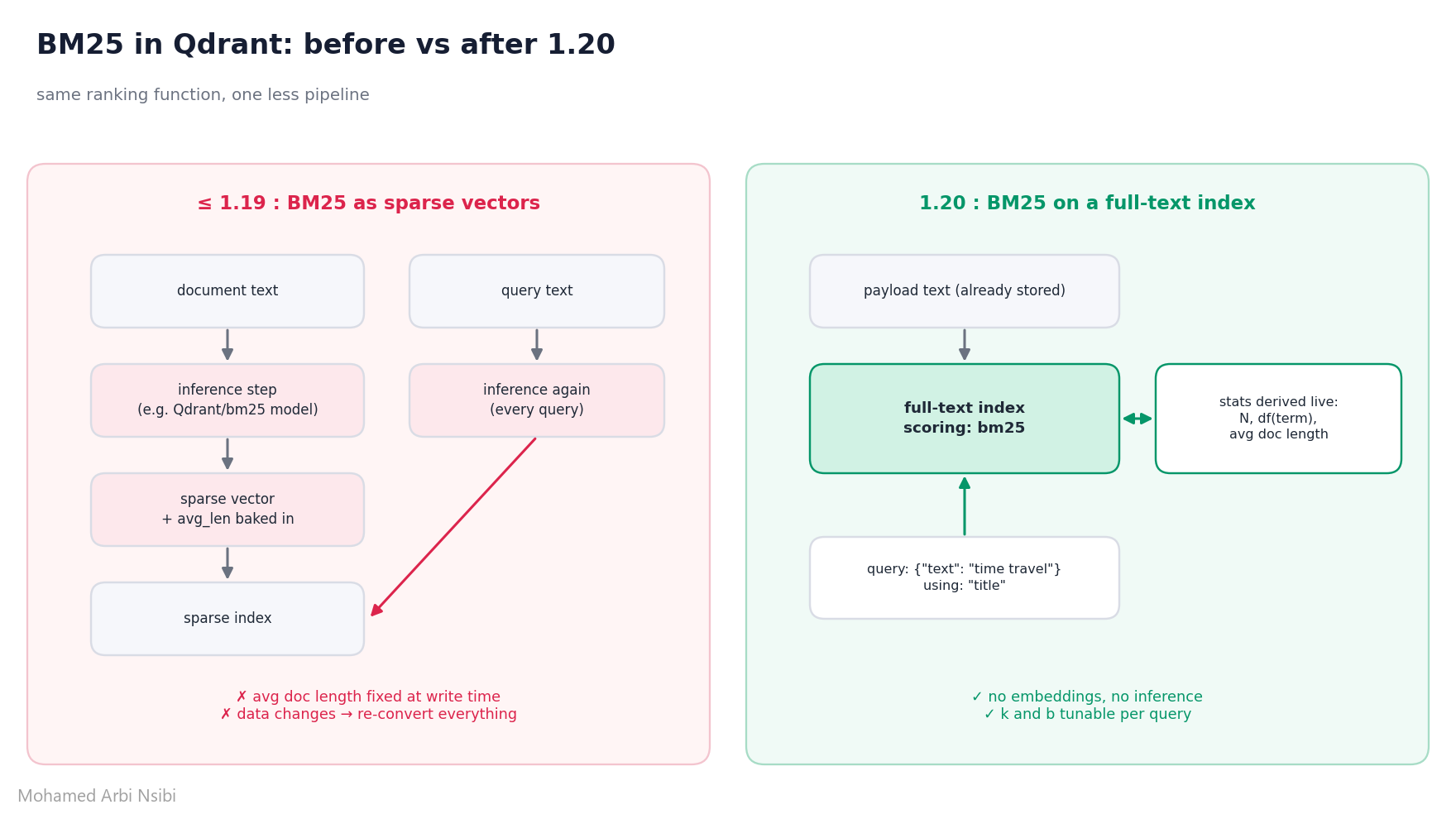
in 1.20, the full-text index itself can do the scoring. Qdrant derives all the BM25 statistics from your data: the number of documents, how many documents contain each term, and the average document length. You send raw text, Qdrant tokenizes it with the same settings as the index, and ranks
think of it like this: before, you had to precompute a “summary card” for every book and hand it to the librarian, and if the library grew, your cards went stale. now the librarian just reads the books on the shelf and keeps the stats up to date herself
two steps. First, a full-text index with bm25 scoring on the field you want to search:
from qdrant_client import QdrantClient, models

client = QdrantClient(url="http://localhost:6333")

# payload only, no vectors at all
client.create_collection(collection_name="books", vectors_config={})

client.create_payload_index(
    collection_name="books",
    field_name="title",
    field_schema=models.TextIndexParams(
        type=models.TextIndexType.TEXT,
        tokenizer=models.TokenizerType.WORD,
        lowercase=True,
        scoring=models.TextScoringParams(type=models.TextScoringType.BM25),  # <-- the whole feature
    ),
)
then query it with the new TextQuery, passing the indexed field in using:
res = client.query_points(
    collection_name="books",
    query=models.TextQuery(text="time travel"),
    using="title",
    limit=5,
)
here’s what my run returned on a tiny books collection:
 1.265  Time Travel for Beginners: A Practical Guide
 1.049  11/22/63: A Novel About Time Travel and Kennedy
 1.046  Travel Guide to Italy
 0.597  The Time Machine
 0.502  The Time Traveler's Wife
two things worth noticing. “Travel Guide to Italy” ranks third with only ONE of the two terms, because in my small corpus “travel” is rarer than “time”, so IDF gives it more weight. That’s BM25 doing exactly its job. And “The Time Traveler’s Wife” is last because without stemming, traveler's is not travel. If that bothers you, add a Snowball stemmer to the index (the hybrid example below does exactly that). Text processing settings apply to both the indexed text and the query
Tuning k and b per query
the two BM25 knobs are set per query, not on the index, so tuning them never requires a rebuild:
k(default 1.2): term frequency saturation. how much does repeating a word keep helping?b(default 0.75): document length normalization, from 0 (off) to 1 (full)
res = client.query_points(
    collection_name="books",
    query=models.TextQuery(
        text=models.TextQueryInput(
            query="time travel",
            scoring=models.Bm25Scoring(bm25=models.Bm25Params(k=1.5, b=0.0)),
        ),
    ),
    using="title",
    limit=5,
)
with b=0.0 in my run, the two titles containing both terms tied at the top regardless of their length. Small detail from the docs that will save you a debugging session: the parameter is named k, not k1
Hybrid search without a sparse model
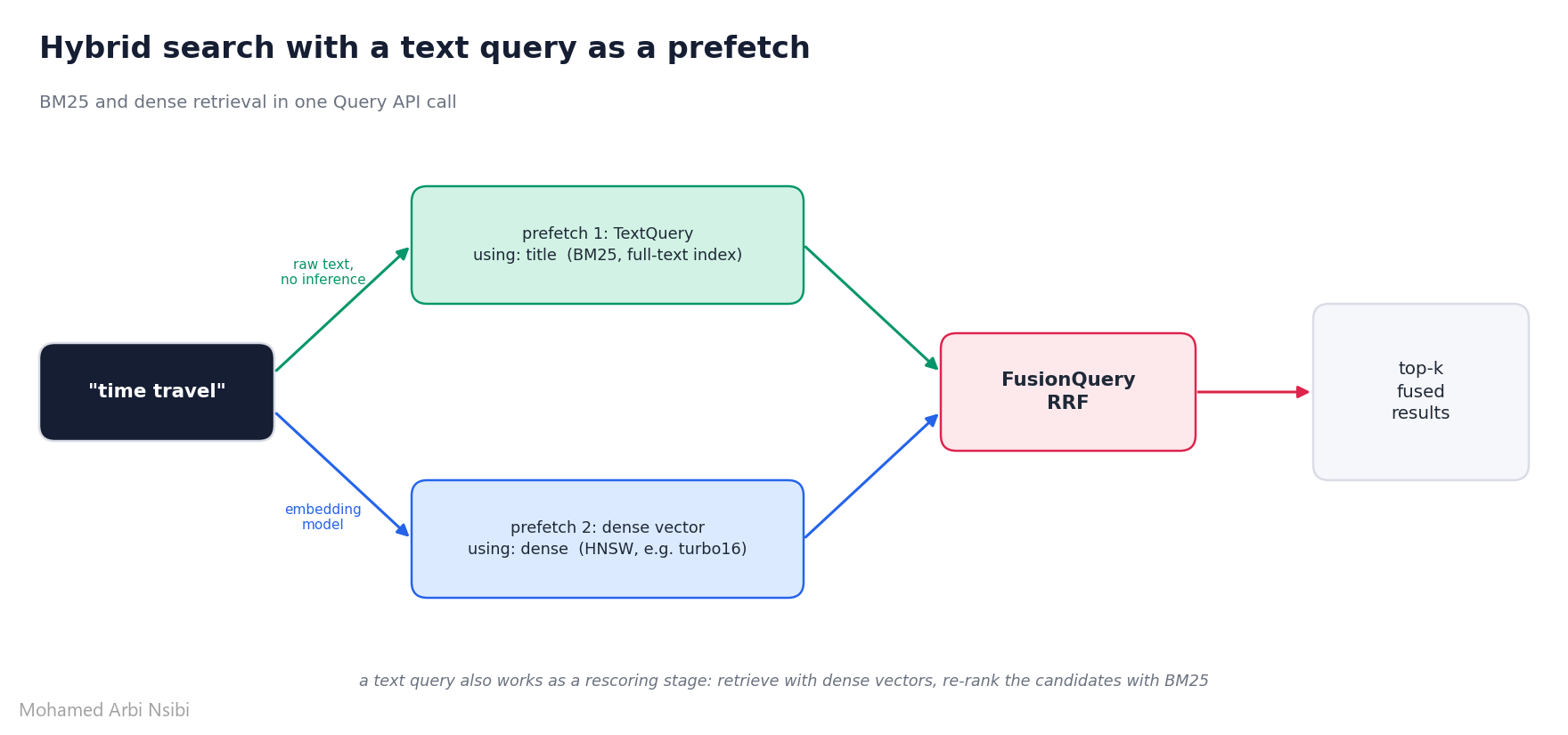
a text query works anywhere in the Query API, including as a prefetch. So hybrid search becomes BM25 on the payload + dense vectors, fused with RRF, in one call:
res = client.query_points(
    collection_name="hybrid_demo",
    prefetch=[
        models.Prefetch(query=models.TextQuery(text="time travel"), using="title", limit=20),
        models.Prefetch(query=dense_query_vector, using="dense", limit=20),
    ],
    query=models.FusionQuery(fusion=models.Fusion.RRF),
    limit=5,
)
(the companion script uses random dense vectors so it runs without any model download, swap in your real embedding model for actual semantic search)
Migrating from sparse BM25
sparse BM25 is still supported, nothing breaks. If your text is already in the payload, you can switch without re-uploading anything: create the full-text index with scoring, configure the same text processing as your sparse model, and replace sparse queries with text queries. One trap: the default sparse BM25 model applies English stemming and stopwords, while a full-text index doesn’t by default. Set the english Snowball stemmer and english stopwords on the index, or your scores won’t line up
2. The code tokenizer: identifiers are not words
a tokenizer decides how text gets split into searchable tokens. The default word tokenizer splits on spaces and punctuation, which is great for prose and bad for code. Programmers glue words together: getUserName, get_user_name, XMLHttpRequest. Same idea, three spellings
1.20 adds a code tokenizer that splits identifiers on underscores AND case changes (acronyms included), keeps digits with their letters (sha256, k8s, utf8 stay whole), and also indexes the joined camelCase word so a lowercase hashmap still finds HashMap:
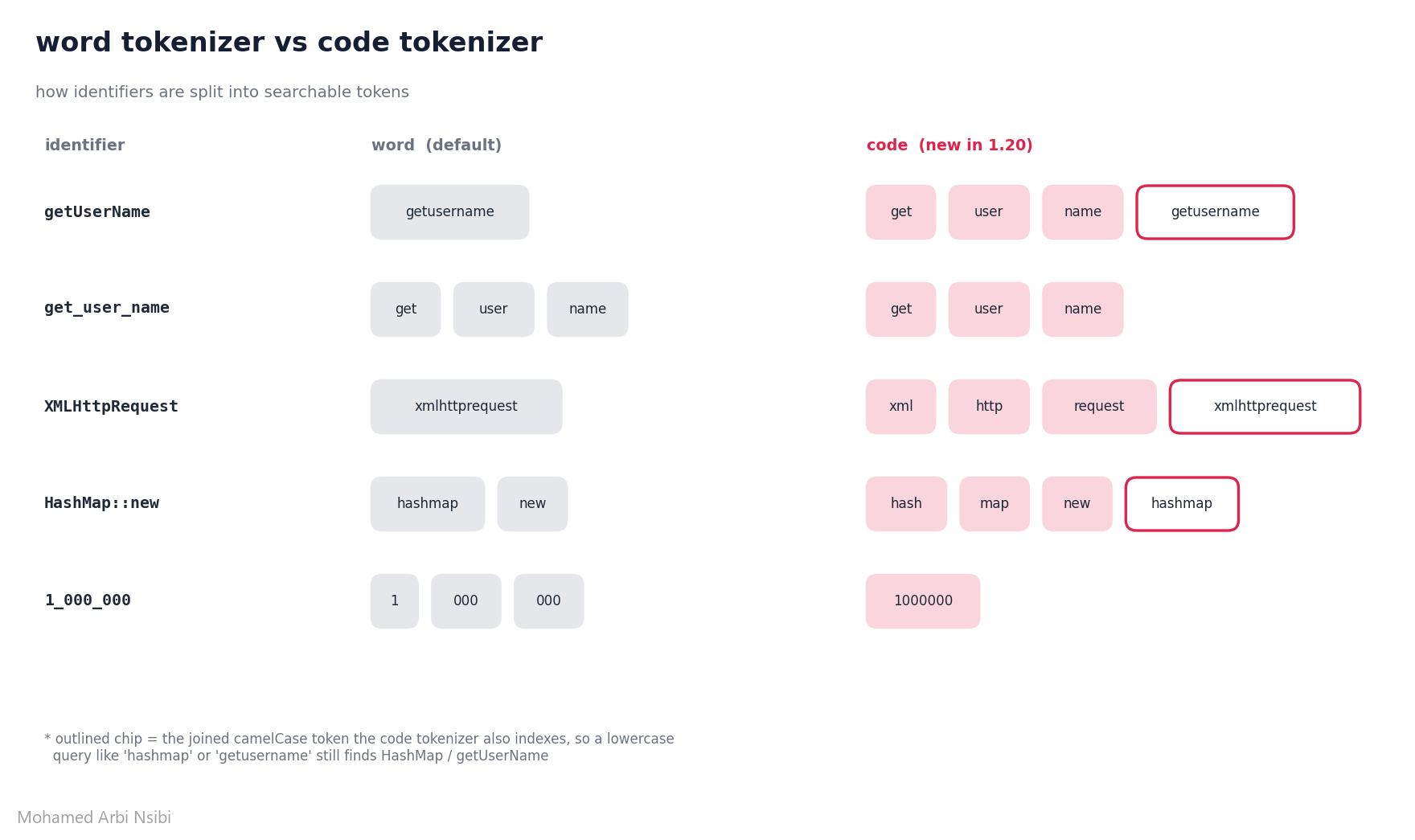
it’s a one-line change on the index:
client.create_payload_index(
    collection_name="code_search",
    field_name="code",
    field_schema=models.TextIndexParams(
        type=models.TextIndexType.TEXT,
        tokenizer=models.TokenizerType.CODE,   # <-- new in 1.20
        lowercase=True,
        scoring=models.TextScoringParams(type=models.TextScoringType.BM25),
    ),
)
I indexed the same 7 snippets twice, once per tokenizer, and ran the same queries. Real output:
query: 'user name'
  word -> 2 hits   (get_user_name, GET_USER_NAME)
  code -> 3 hits   (get_user_name, GET_USER_NAME, getUserName)

query: 'http request'
  word -> 0 hits
  code -> 1 hit    (XMLHttpRequest)

query: '1000000'
  word -> 0 hits
  code -> 1 hit    (MAX_BUFFER_SIZE = 1_000_000)
interesting detail I didn’t expect: the word tokenizer already splits on underscores, so snake_case was half-fine before. It’s camelCase, acronyms and digit separators that it completely misses. Combine code with BM25 scoring and you have ranked code search with zero embeddings, which is a really nice first stage for a code RAG pipeline
3. Per-Element Indexes: nested filters without reading payloads
payloads often contain arrays of objects: a product with several offers, each with its own shop and price. A nested filter asks for points where one single element satisfies all conditions, like “an offer from shop A that costs under $100”
the diagram explains why that’s harder than it looks:
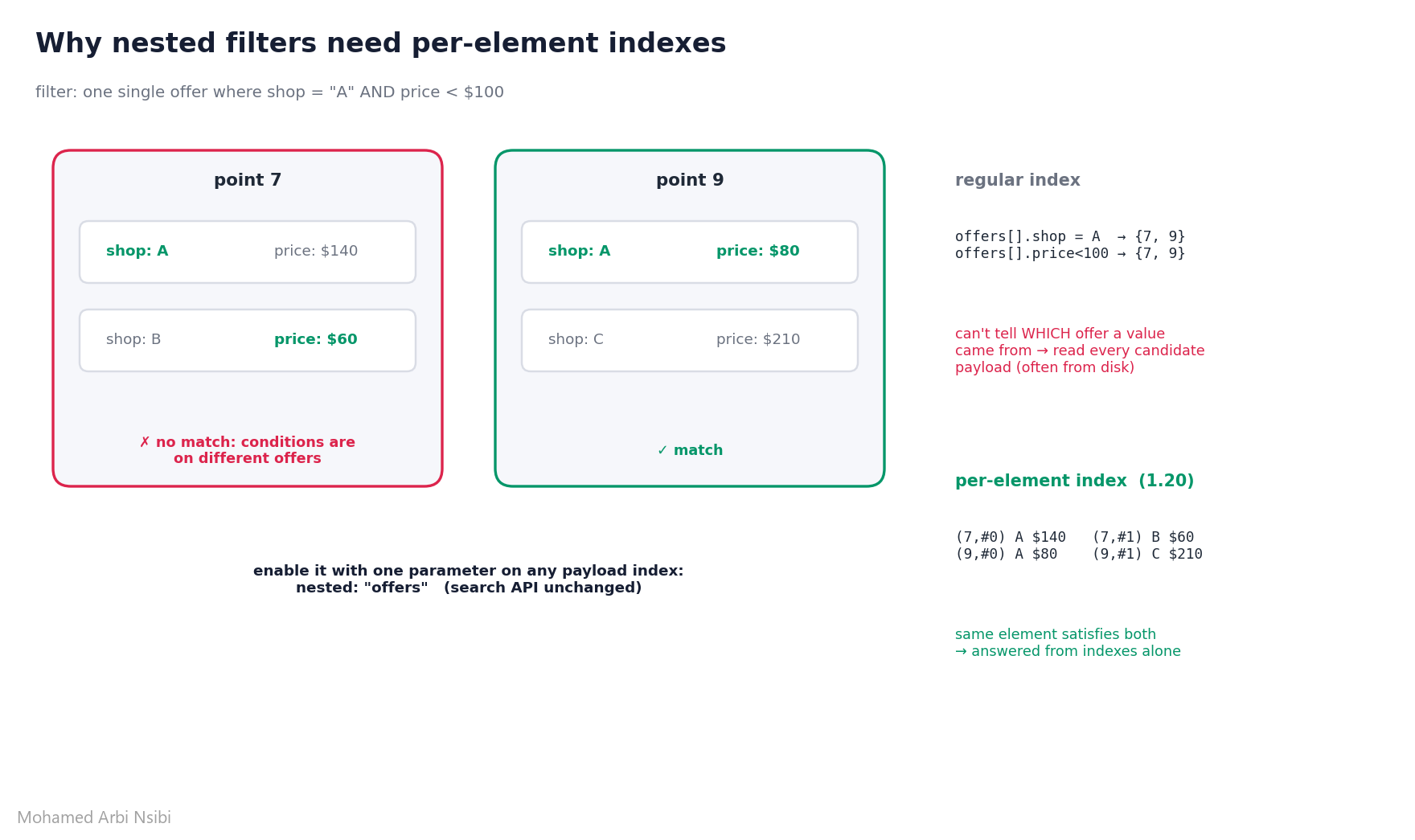
point 7 has a shop A offer AND an offer under $100, but they’re different offers, so it must not match. A regular index on offers[].shop only knows “point 7 has shop A somewhere”, it forgot WHICH offer that value came from. So until now, the indexes could only narrow the candidates, then Qdrant had to read the payload of every remaining candidate (often from disk) to check element by element
1.20 adds a nested parameter to every payload index type. It creates a per-element index that stores each array element separately, so Qdrant can answer the whole nested filter from the indexes alone:
client.create_payload_index(
    collection_name="products",
    field_name="offers[].shop",
    field_schema=models.KeywordIndexParams(
        type=models.KeywordIndexType.KEYWORD,
        nested="offers",            # <-- per-element
    ),
)
client.create_payload_index(
    collection_name="products",
    field_name="offers[].price",
    field_schema=models.FloatIndexParams(
        type=models.FloatIndexType.FLOAT,
        nested="offers",            # <-- same array for every condition
    ),
)
and the nicest part: the search API doesn’t change. Your existing nested filter is the same one:
nested_filter = models.Filter(must=[
    models.NestedCondition(nested=models.Nested(
        key="offers",
        filter=models.Filter(must=[
            models.FieldCondition(key="shop", match=models.MatchValue(value="shop_A")),
            models.FieldCondition(key="price", range=models.Range(lt=100)),
        ]),
    ))
])
I benchmarked it: 100,000 points, 1 to 6 random offers each, 10 shops, both collections built with identical data, median of 20 exact counts:
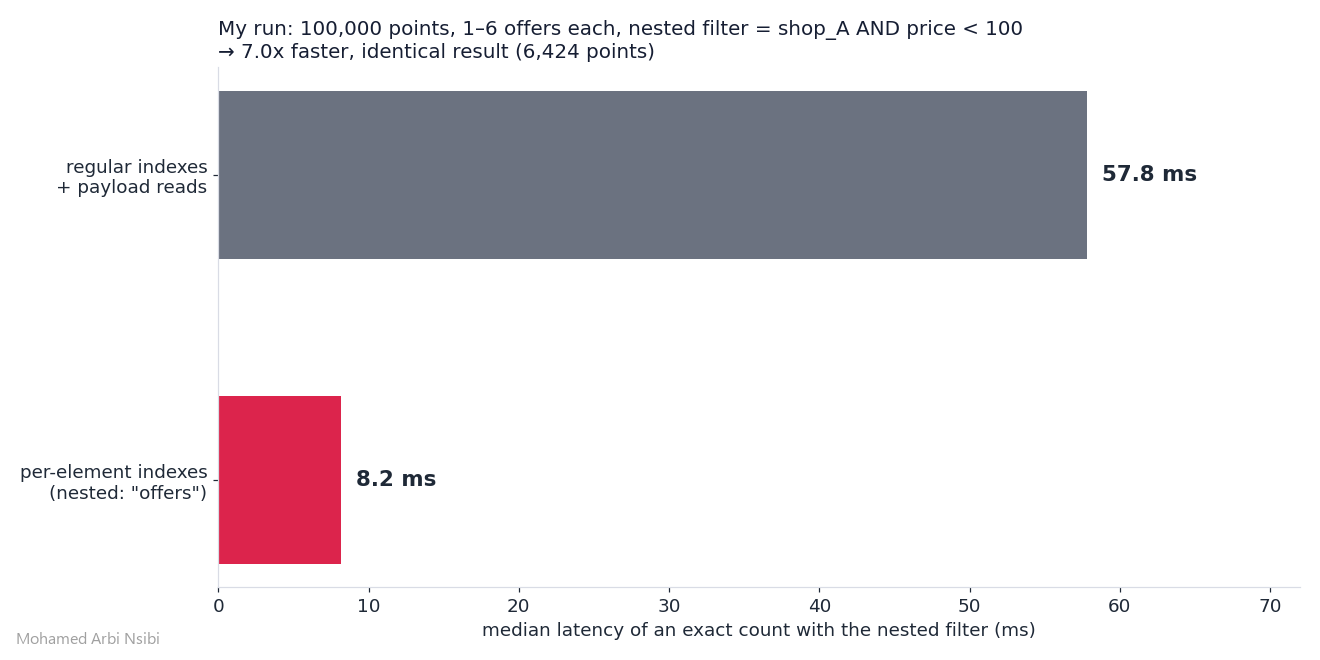
7.0x faster, identical result (6,424 points). Sanity check from the same script: a naive “has shop A anywhere AND has a price under 100 anywhere” would have returned 16,918 points, more than 2.5x too many. That’s exactly the point-7 trap. Qdrant’s own benchmark reports 7 to 38x depending on the filter, and since my payloads were all in memory (the best case for the old path), the gap should be even bigger when payloads have to come from disk.
constraints to know: the field must live inside the array elements, only one array level is supported (no a[].b[]), a per-element index can’t also be a tenant or principal index, and changing nested on an existing index rebuilds it. Also, is_empty and full-text conditions behave per element on these indexes, so read the differences section before switching
4. Turbo16 and Turbo8: TurboQuant fills the gaps
in 1.19 we got turbo4: TurboQuant applied at the datatype level, 4 bits per coordinate, no full-precision copy (I covered it in my 1.19 post, and the math behind TurboQuant here). Super compact, but on some datasets recall drops noticeably. Between turbo4 and float32, your only options were float16 (4x bigger than turbo4) and uint8 (you quantize the vectors yourself before uploading)
1.20 fills that gap with two new datatypes:
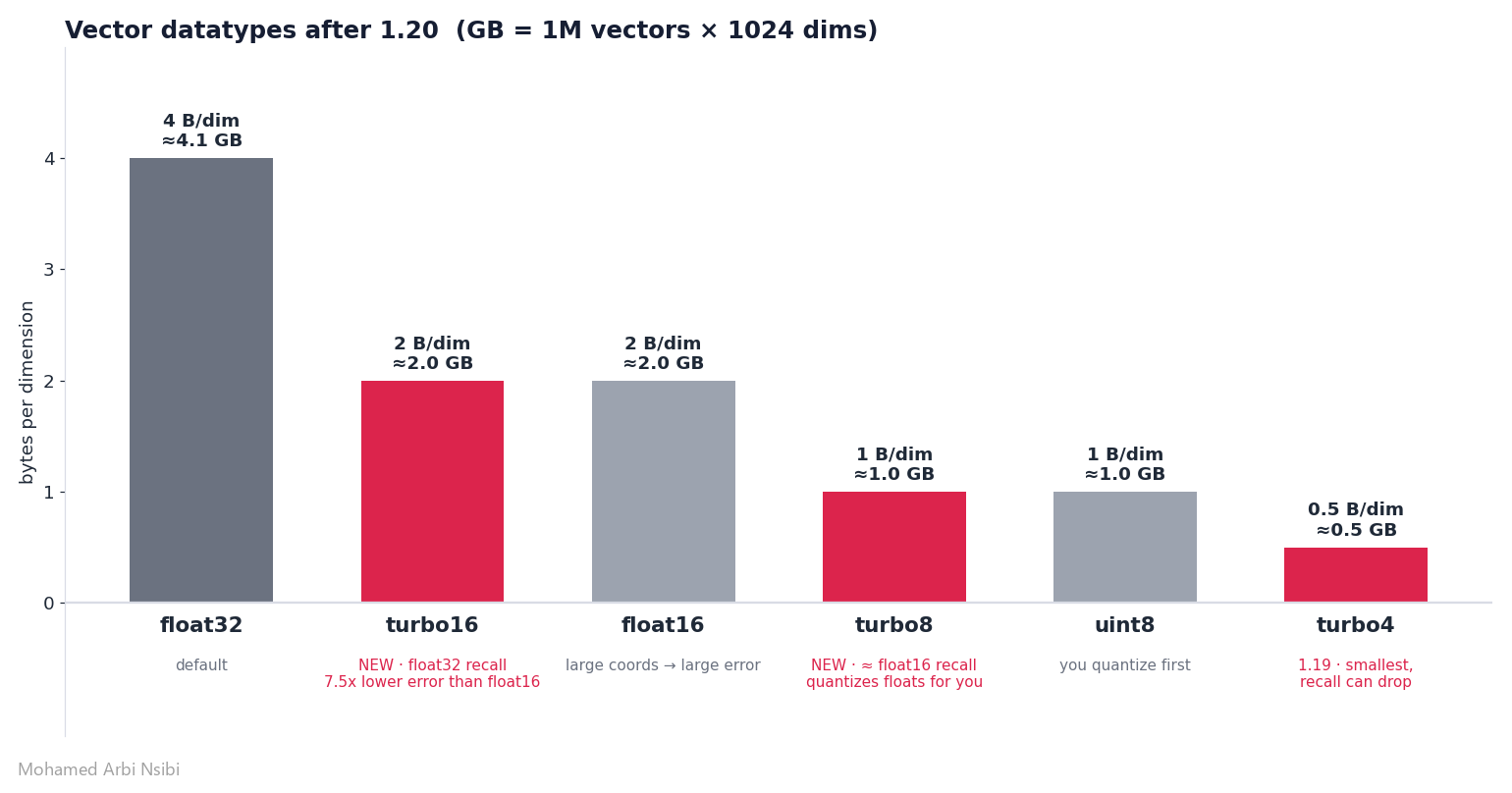
turbo16: float32 accuracy at half the size
turbo16 uses 2 bytes per dimension, same as float16. So why would it be better? Because float16 keeps the same relative precision for every coordinate: a huge coordinate gets a huge rounding error. And some popular embedding models (OpenAI’s text-embedding-ada-002, CLIP, Cohere) have a few very large coordinates that dominate the score
turbo16 first applies the TurboQuant rotation, which spreads the energy evenly across all coordinates, then stores everything on one 16-bit integer grid with a single scale per vector. No coordinate gets special treatment, no coordinate gets punished. Qdrant measured 7.5x lower reconstruction error than float16 over 13 datasets, recall@10 within 0.001 of float32 on all 12 search benchmarks, and HNSW latency at about 0.81x of float16 on x86
turbo8: float16 recall at a quarter of float32
turbo8 stores 1 byte per dimension like uint8, but takes regular float vectors and quantizes them for you. Qdrant reports recall close to float16, searches 1.1 to 2.4x faster than float16, and the biggest gains over turbo4 on low-dimensional data (SIFT, Deep-image)
both are one config line:
client.create_collection(
    collection_name="docs_turbo16",
    vectors_config=models.VectorParams(
        size=768,
        distance=models.Distance.COSINE,
        datatype=models.Datatype.TURBO16,   # or models.Datatype.TURBO8
    ),
)
My measurements
same methodology as my 1.19 post: exact search inside Qdrant vs numpy brute force, recall@10, 5,000 vectors of 768 dims, 100 queries. This time with two synthetic distributions: plain random gaussian (the worst case for any quantizer), and gaussian with 8 coordinates scaled 40x to mimic the “few huge coordinates” shape of ada-002 / CLIP:
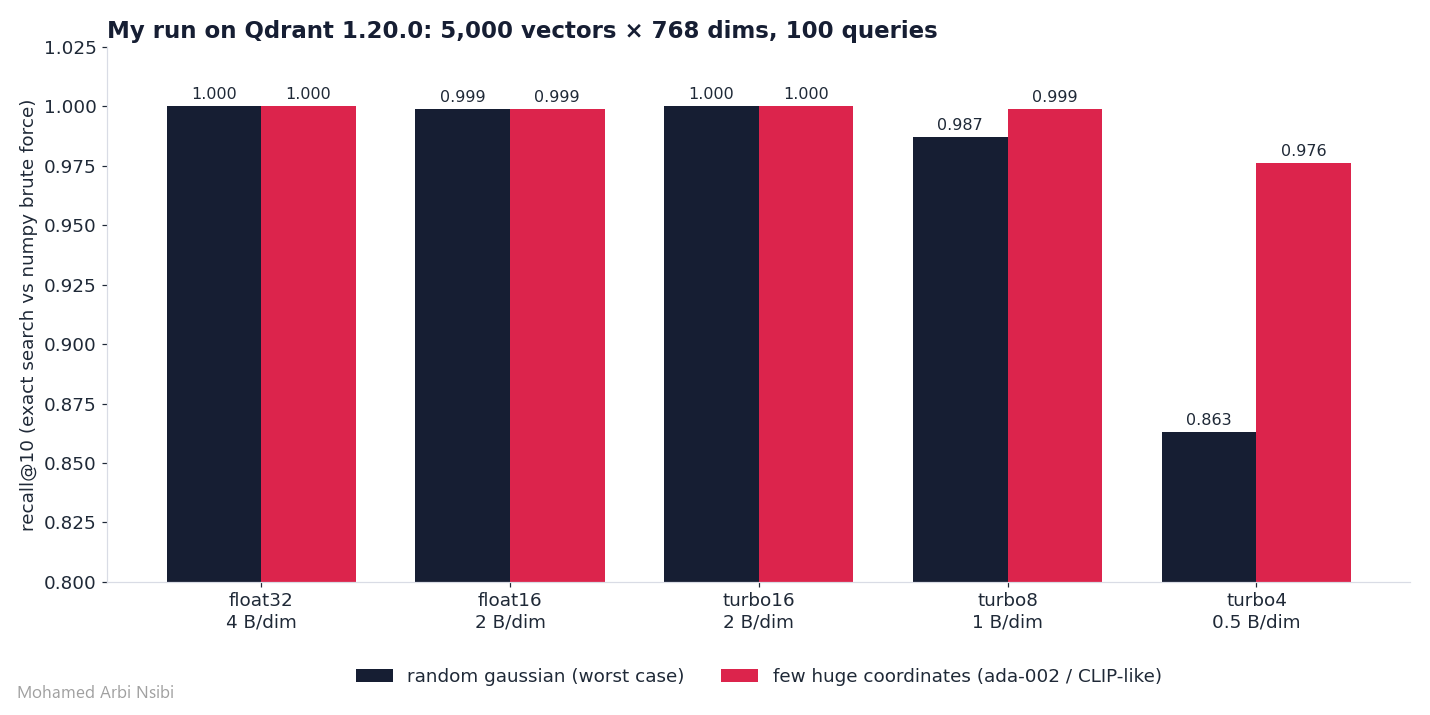
turbo16hit 1.000 on both, matching float32 exactlyturbo8reached 0.987 on the worst case and 0.999 on the outlier-heavy data, at a quarter of float32’s sizeturbo4landed at 0.863 on gaussian, almost exactly the 0.866 I measured in 1.19, nice consistency between releases
honest caveat: at 768 dims and this tiny scale, float16 also scored 0.999 in my run, so I couldn’t reproduce the float16 degradation Qdrant observed on real ada-002 and CLIP embeddings (0.995). Synthetic data is synthetic data. Always benchmark on YOUR embeddings, the script is in the repo and takes a minute
bits8 TurboQuant quantization
the 8-bit encoding is also available as quantization, meaning a compressed copy next to your float originals, with rescoring:
client.create_collection(
    collection_name="docs_bits8",
    vectors_config=models.VectorParams(size=1024, distance=models.Distance.COSINE),
    quantization_config=models.TurboQuantization(
        turbo=models.TurboQuantQuantizationConfig(
            bits=models.TurboQuantBitSize.BITS8,   # bits4 stays the default
            memory=models.Memory.PINNED,
        )
    ),
)
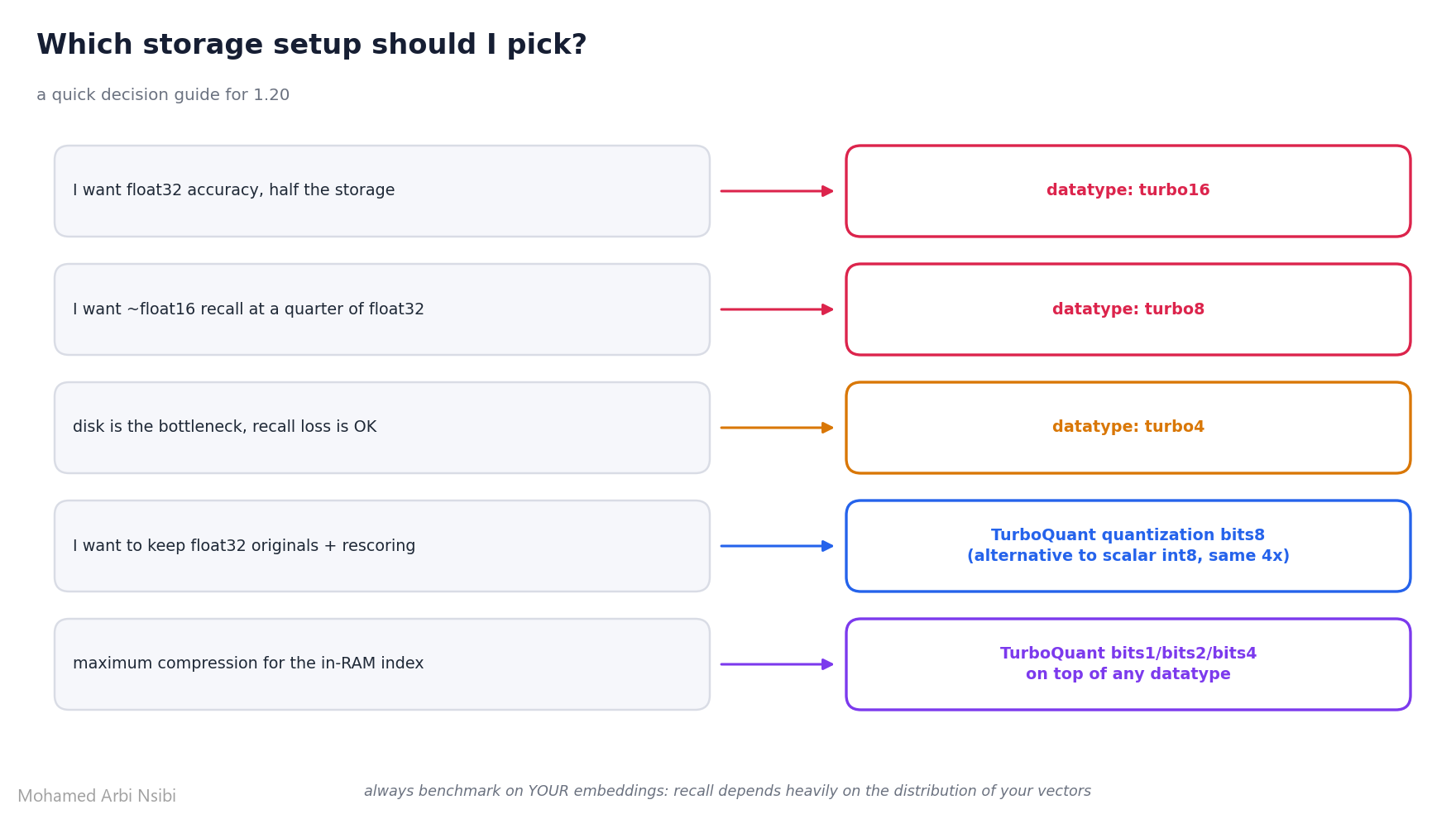
bits8 compresses about 4x, the same ratio as scalar int8 quantization, and in Qdrant’s turbo8 benchmarks the same encoding had higher recall than scalar quantization on 10 of 11 datasets. If you’re running scalar quantization today, bits8 is worth a benchmark. To pick between all of these:
5. Memory Tiers, round two
1.19 introduced memory tiers: one memory parameter with pinned, cached, or cold for every component. 1.20 extends it to one more component and fixes a storage duplication.
The ID tracker gets a tier
the ID tracker maps each point’s ID to its internal location and version. Until now it was always in RAM, about 52 bytes per point. Sounds small until you do the math: 100 million points is roughly 5 GB of RAM just for ID bookkeeping
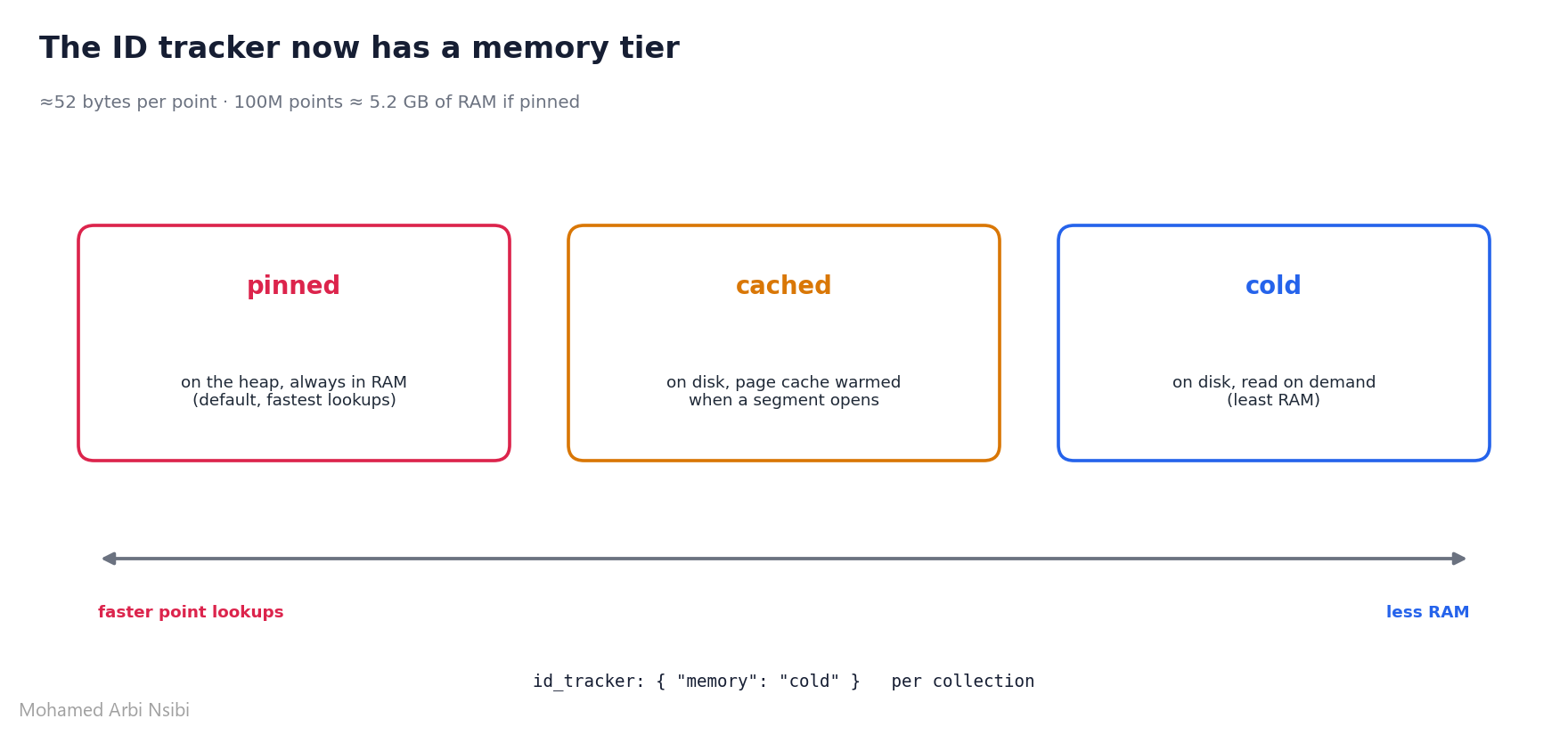
client.create_collection(
    collection_name="huge_collection",
    vectors_config=models.VectorParams(size=1024, distance=models.Distance.COSINE),
    id_tracker=models.IdTrackerParams(memory=models.Memory.COLD),  # <-- new in 1.20
)
pinned stays the default. I verified the setting round-trips: reading the collection config back from the 1.20 server returns id_tracker: {'memory': 'cold'}
Inline storage without duplicate vectors
Inline storage speeds up on-disk HNSW search by putting the original vectors right next to the graph links. The catch: Qdrant also kept them in regular vector storage, so the same vectors were on disk twice. Now they live only in the index file:
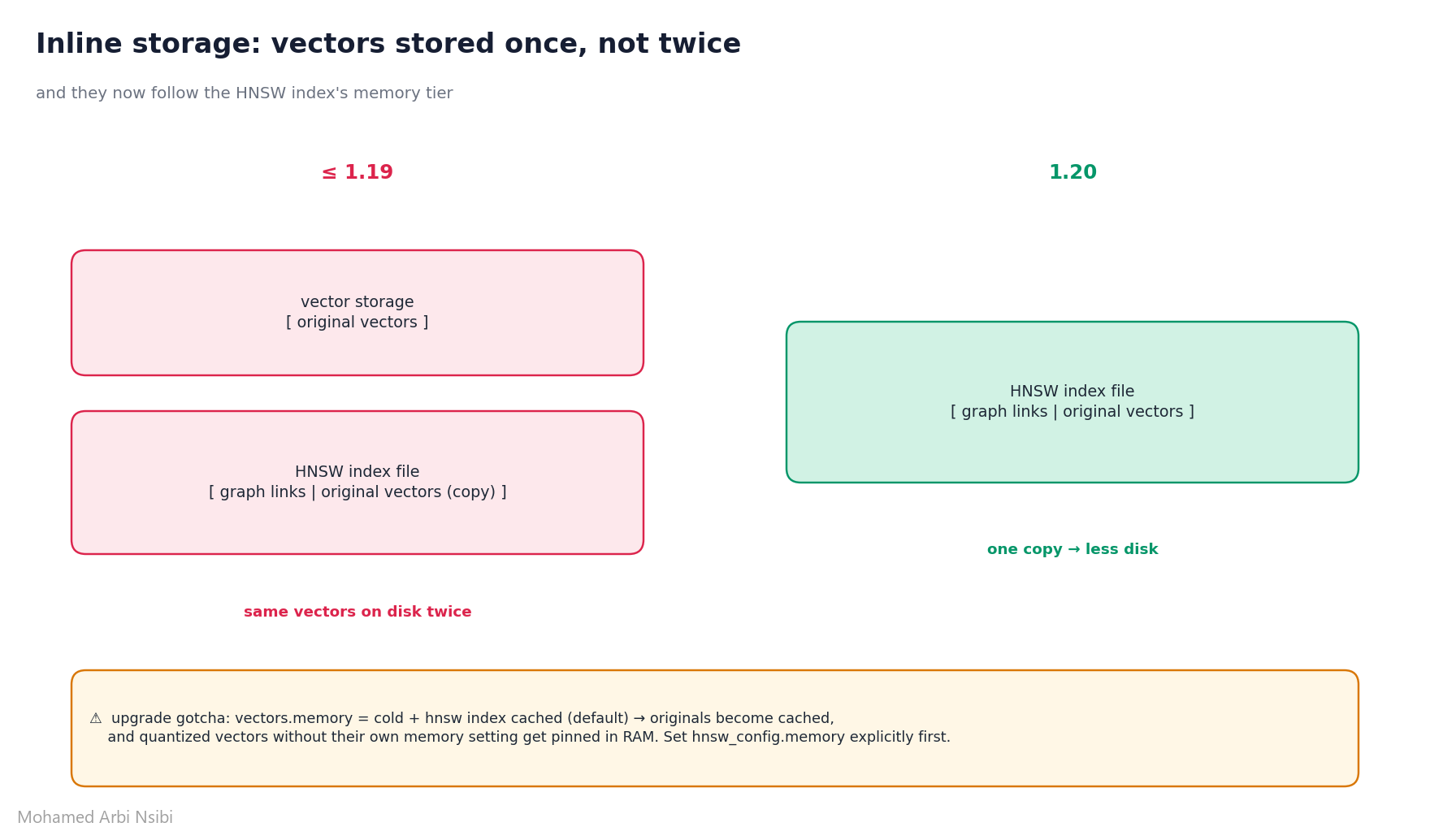
read this one twice before upgrading: because the vectors are now part of the index, they follow hnsw_config.memory instead of vectors.memory. The HNSW index defaults to cached, so a collection with vectors.memory: cold and nothing else set will see its originals become cached, and quantized vectors without their own memory setting get pinned in RAM. Set hnsw_config.memory (and memory on quantization) explicitly before you upgrade.
6. Cluster Security Hardening
in a distributed deployment, peers talk over an internal gRPC API (port 6335 by default). 1.20 makes it harder to reach and harder to misuse:
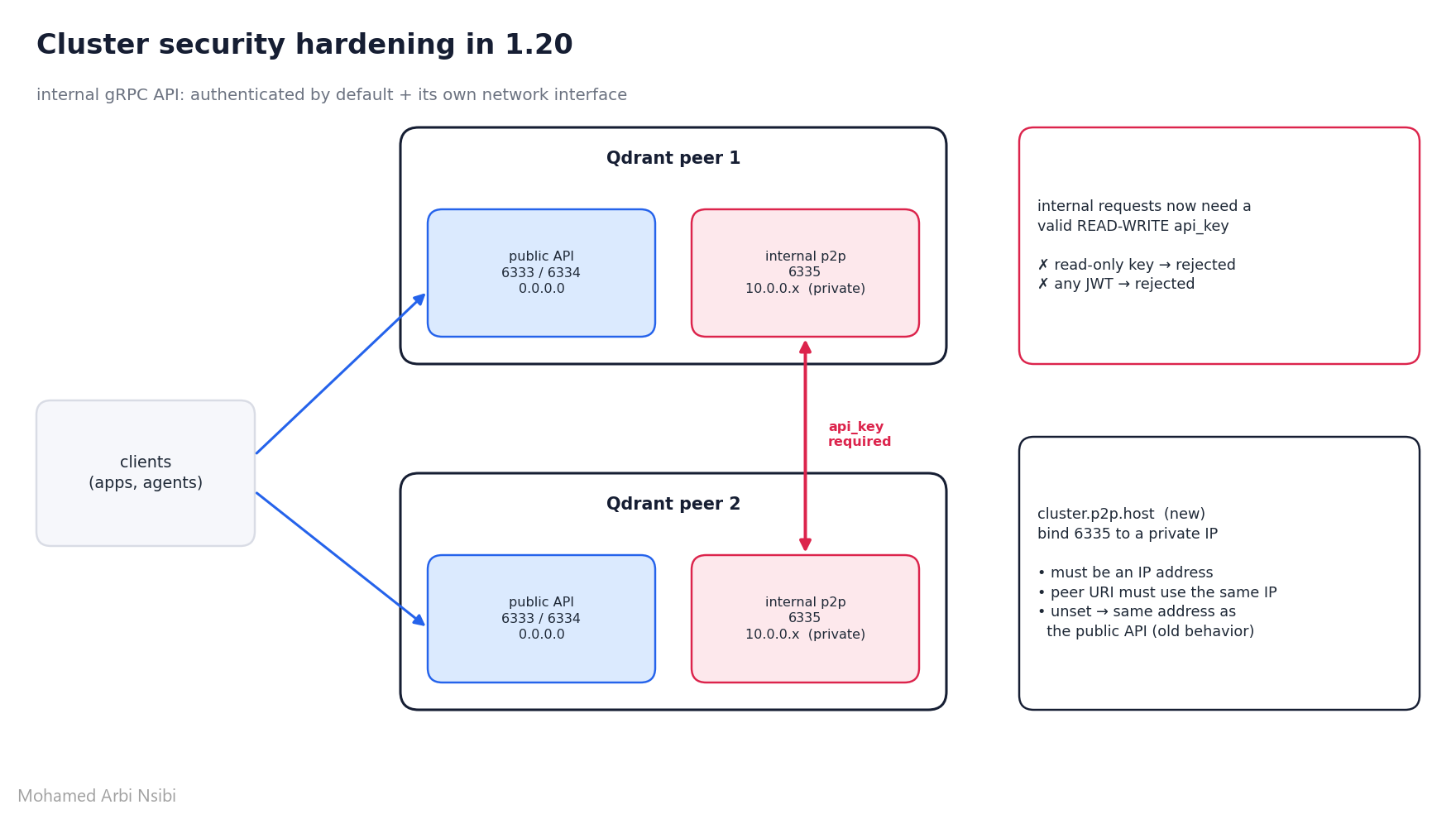
Internal auth by default. When an API key is configured, internal requests must now carry a valid read-write key. The read-only key and all JWTs are rejected on the internal API.
Bind p2p to a private interface. Before, the internal port listened on the same address as the public API, and keeping it private was your firewall’s job. The new cluster.p2p.host setting binds it separately:
# config.yaml
service:
  api_key: ${QDRANT_API_KEY}   # read-write key, required on internal requests in 1.20

cluster:
  enabled: true
  p2p:
    port: 6335
    host: 10.0.0.12            # new in 1.20: must be an IP, peer URI must use the same IP
if you don’t set it, nothing changes, p2p keeps listening on the public API address
Also in this release
quick hits worth knowing:
- Snapshots on GCS and Azure Blob Storage, in addition to local and S3-compatible storage
- Shared snapshot buckets: a new
prefixsetting lets several deployments share one bucket without overwriting each other - Audit logs to stdout/stderr: finally plays nicely with container log collectors
- Collection creation time in collection info (for collections created on 1.20+)
- Safer replica removal: require a minimum number of other active replicas before dropping one
- Log timestamps in local time via the
TZenv variable (UTC is still the default) - Substring match: a new filter condition for “contains”, perfect for URL fragments, file paths and product codes. combine it with the 1.19
prefixkeyword index and it gets faster too:
models.FieldCondition(key="path", match=models.MatchSubstring(substring="/assets/"))qcloud, the Qdrant Cloud CLI: manage clusters, keys, backups from the terminal, scriptable for CI and AI agents.qcloud cluster update <cluster-id> --version v1.20.0upgrades with a rolling restart
Upgrading safely
as always, one minor version at a time: 1.18.x → 1.19.x → 1.20.0. Qdrant Cloud does this automatically when you pick the target version
the internal auth change is the one that can actually break a cluster, so check your keys first:
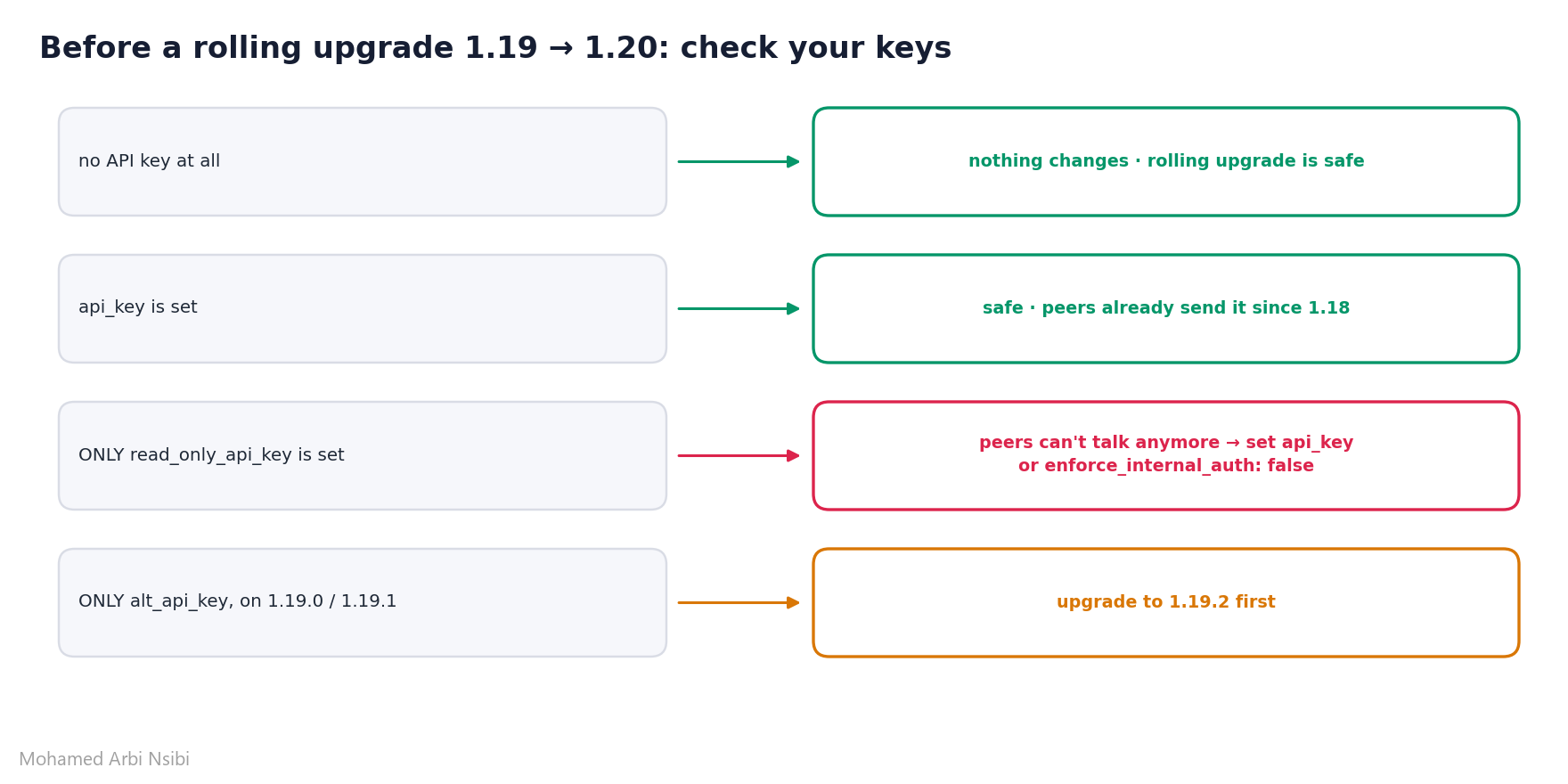
and don’t forget the inline storage memory tier gotcha from section 5
Try it yourself
everything in this post is reproducible. the companion project contains:
01_bm25_fulltext.py: BM25 on a full-text index, default and tunedk/b02_code_tokenizer.py:wordvscodetokenizer on real identifiers03_nested_filter.py: 100k points, regular vs per-element indexes, timed04_turbo_datatypes.py: recall@10 for float32 / float16 / turbo16 / turbo8 / turbo405_tiers_and_bits8.py: ID tracker tier + bits8 quantization, verified from the server06_hybrid_bm25_dense.py: BM25 + dense prefetch fused with RRF
spin up Qdrant with docker compose up -d, then python scripts/01_bm25_fulltext.py. no API keys, no embedding model downloads
definitions
- BM25: a ranking function for keyword search. it rewards documents that contain the query terms, more for rare terms (IDF), with diminishing returns for repeated terms (
k), and adjusts for document length (b) - full-text index: a payload index that splits text into tokens so you can filter (and now rank) by the words it contains
- tokenizer: the algorithm that decides where one token ends and the next begins.
word,whitespace,prefix,multilingual, and nowcode - per-element index: a payload index that remembers which array element each value came from, so nested filters don’t need to read payloads
- TurboQuant rotation: a distance-preserving rotation that spreads a vector’s energy evenly across coordinates before rounding, which is why
turbo16beatsfloat16on embeddings with outlier coordinates - datatype vs quantization: a datatype is how the ORIGINAL vectors are stored. quantization adds a SEPARATE compressed copy alongside them, used for fast search + rescoring
- ID tracker: the internal structure mapping your point IDs to their location and version inside segments
Conclusion
1.20 is a release about removing detours. BM25 no longer needs a sparse-vector pipeline, an inference step, or a stale avg_len: the index reads your payload and keeps the statistics honest. The code tokenizer turns that into code search with zero embeddings. Per-element indexes quietly make every existing nested filter faster without touching a single query (7x in my run). And turbo16 and turbo8 finally give TurboQuant a full ladder from 16 bits down to 4, so “how much precision do I actually need?” has a clean answer at every step. My advice: if you’re running sparse BM25 with the text already in your payload, try the full-text index first, it’s an index creation and a query change, no re-upload. And before the rolling upgrade, check your API keys and your HNSW memory tier. Two minutes of reading saves a broken cluster.
References :
- Qdrant 1.20 official release blog
- Qdrant v1.20.0 changelog on GitHub
- Full-Text Search & BM25 documentation
- Indexing docs: BM25 scoring, code tokenizer, per-element indexes
- Nested object filter documentation
- Vector datatypes: turbo16, turbo8, turbo4
- TurboQuant quantization documentation
- Memory Tiers documentation
- Security: internal authentication and p2p binding
- Okapi BM25 (Wikipedia)
- TurboQuant: Online Vector Quantization with Near-optimal Distortion Rate (arXiv:2504.19874)
- My Qdrant 1.19 post: Turbo4 & Memory Tiers
- My deep dive on the TurboQuant math
- Full code for this article

(END)