You’re scaling your AI application. Then you hit The Memory Wall!
Scaling vector search to millions or even billions of points introduces a massive headache: skyrocketing memory consumption and costs. Consider a collection of just 100 million embeddings, each with 1024 “float32” dimensions. This can consume over 400GB of RAM just for the raw vectors, not including the indexing overhead.
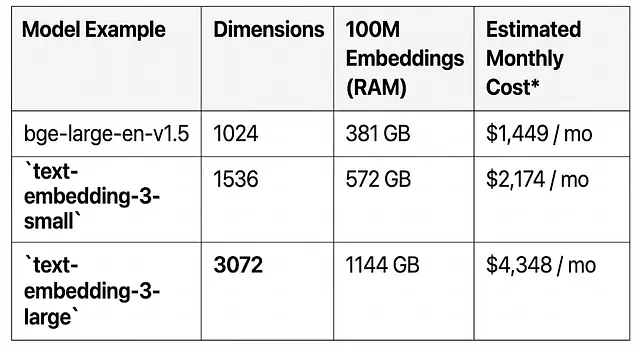
In this guide, we explore Quantization as the powerful solution for this problem, compressing high-precision vectors into memory-efficient formats.
The Solution: Quantization
Not all quantization is created equal. We explore impactful ways to implement vector quantization to deliver both extreme efficiency and high accuracy.
1. The Safe Bet: Scalar Quantization
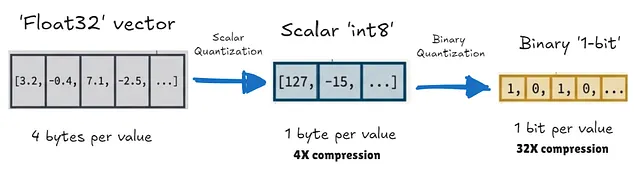
Scalar Quantization converts float32 values into lower-precision integers, most commonly 8-bit (int8). This maps the continuous range of values to a discrete set of 256 integers.
- Result: 4x reduction in memory and storage requirements.
2. The Extreme Bet: Binary Quantization
Binary Quantization (BQ) is the ultimate compression technique. It converts each float32 value into a single bit (0 or 1), keeping only the sign of each dimension.
- Result: 32x reduction in memory. That 400GB collection shrinks to just 12.5GB, easily fitting on a consumer-grade GPU.
The Secret to Accuracy: Two-Stage Search
You might wonder, “Doesn’t aggressive quantization lose precision?” Yes, but we can get it back.
The secret lies in a two-stage architecture:
- Fast Filtering: A fast approximate search is performed on the quantized data in RAM to retrieve a large set of candidates.
- Precise Re-ranking: The system fetches the original full-precision
float32vectors (cheaply stored on disk) for only the top candidates and recalculates the exact distance.
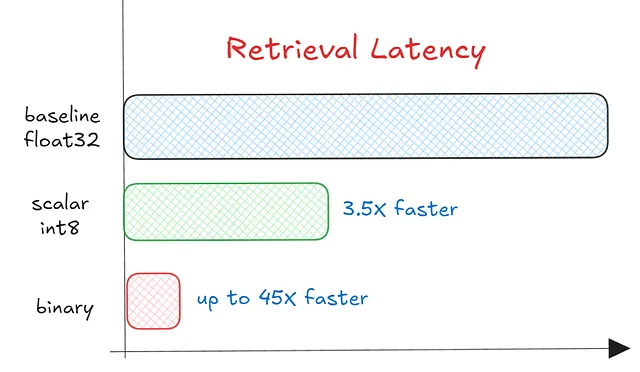
This hybrid approach gives you the best of both worlds: the speed and memory savings of quantized search with the accuracy of original vectors.
Implementation
Modern vector databases like Qdrant support this out of the box. You can control the tradeoff between speed and accuracy using parameters like oversampling and escore.
Here is a sneak peek at how simple it is to enable Binary Quantization in Qdrant:
client.create_collection(
    collection_name="my_binary_collection",
    vectors_config=models.VectorParams(
        size=1536,
        distance=models.Distance.COSINE
    ),
    quantization_config=models.BinaryQuantization(
        binary=models.BinaryQuantizationConfig(always_ram=True),
    ),
)
To dive deeper into the implementation details, performance benchmarks, and how to generate binary embeddings directly with SentenceTransformers, check out the full article.
References

(END)